👀 DBMS
⦿SQL kYA hai
◎ SQL ek language hai .
◎SQL ek quray language hai or iske use se data base ko access kiya jata hai.
◎ye 1970 me start hui
◎starting me iska name siqual tha
◎iska use database ko access karne database ke record ko update karne and database ke new table ko crete karne ke use kiya jata hai .
◎iska kuch command
Select,delete, update, insert into, alter database ....
◎SQL me jo command use kiya jate hai un command me jo keyword use kiya jata hai use SQL statement kha jata hai ,
◎or SQL statement three type ke hote hia.
1.DDL(data Difination Language)
◎inke help se different task perform kar sakte hia .
◎new table create kar sakte hai
2.DML (Data Manipulation language)
◎Data ko access karke manupulate kiya jata hai
◎DAta ko update or delete kar sakte hai
3.TCL
·
SQL stands for (Structured Query language).ये RDBMS(रिलेशनल database Managment सिस्टम)language data को store करने के लिए काफी मदगार language है //
·
SQL में data को manipulate और retrive किया जाता है /
·
SQL ये open-सोर्स language है..
·
SQL में User daura कुछ record and createकिये जाते है
·
इस रिकार्ड्स को कुछ clauses और expression को इस्तेमाल करके modify, update, delete किया जाता है //
·
Sql ये RDBMS data को अपने अंदर store करता है //
·
Sql की queries को MYSQL, SQL server, PostGRE SQL,MS access ,Oracle इन किसी भी database में store किया जाता है
⦿MYSQL Kya hai
ye Relational database management system hai or ye open sourse Database management system hota hai iska pura name hai MY STRCTURED QUERY LANGUAGE hai iska paryog XAMPP or WAMPP jayse prisidh web server pr kiya jata hai
◎MYSQL ek database management system hai .
◎MYSQL ek open sourse database .
⦿Cmd pe SQL program likhne ke liya step:-
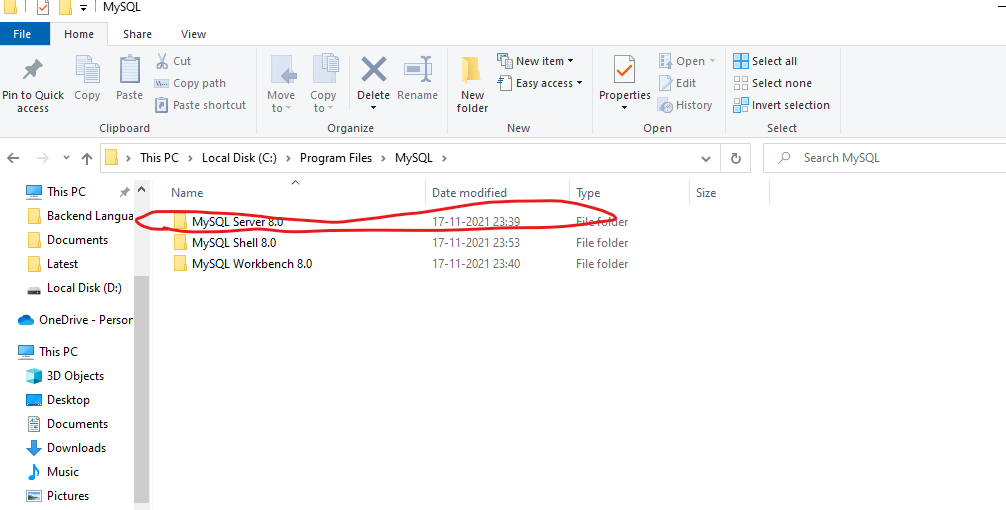
STEPS 1:- MYSQL server 8.0 install karna hoga ya
MYSQL Community server install karna hoga. neche link hai
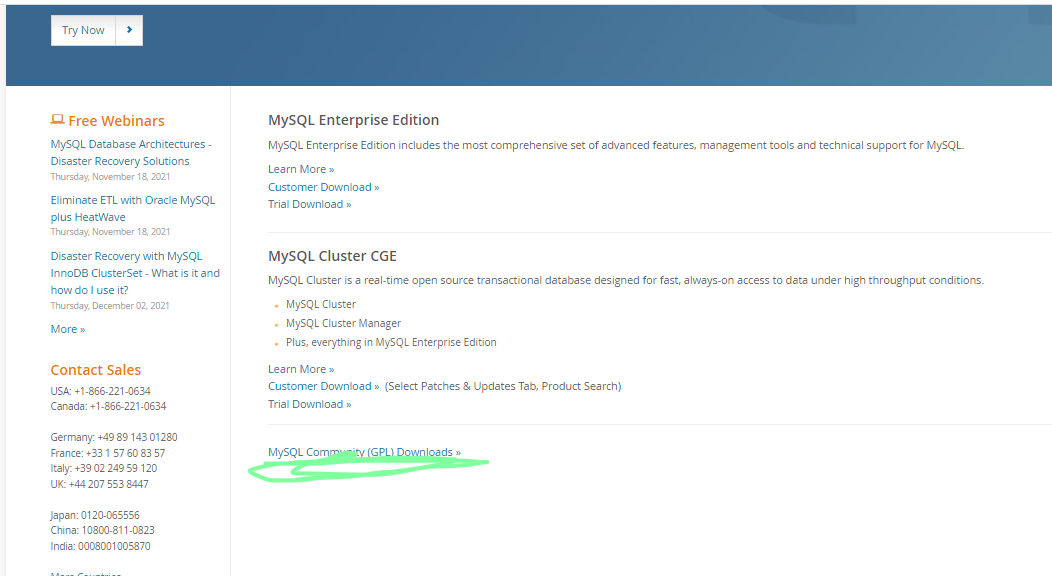
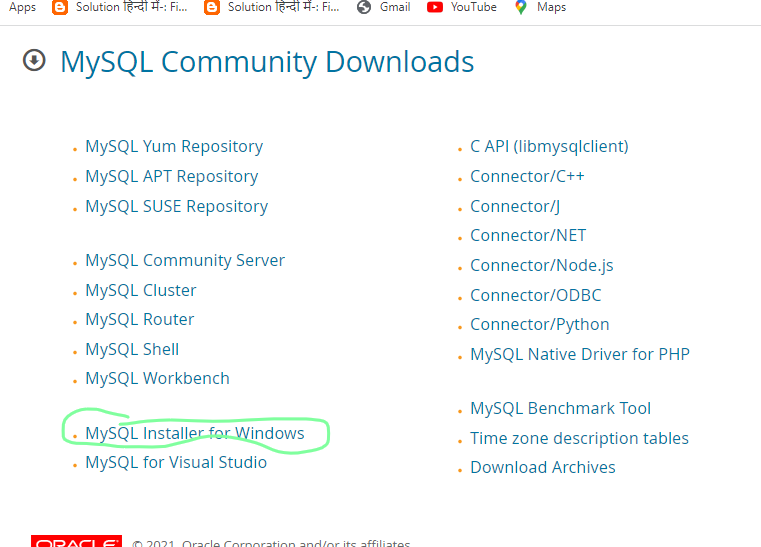
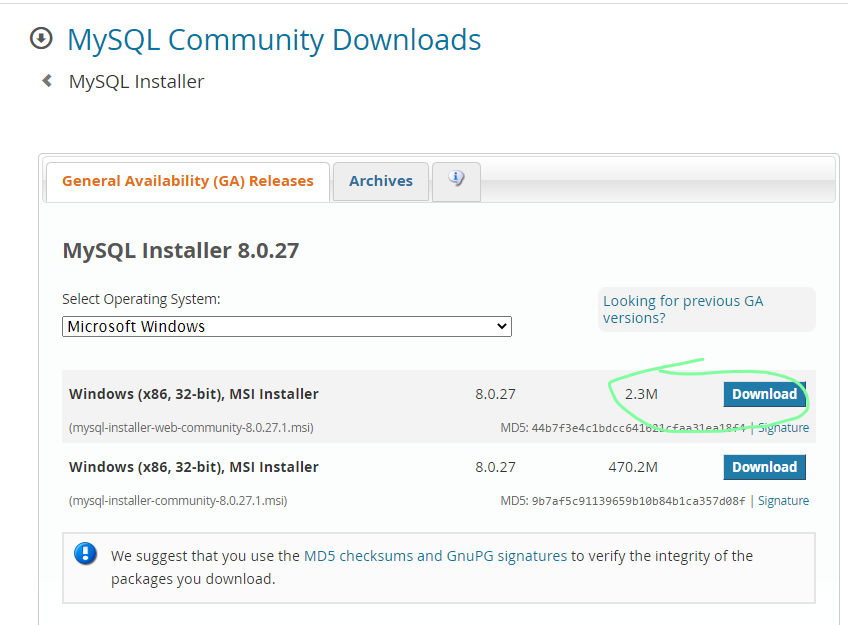
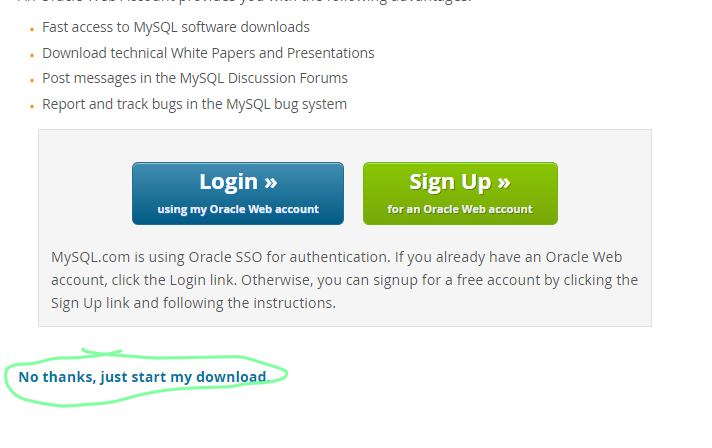
https://www.mysql.com/downloads/
jisme ham image me circle kiya red colure se.wo install karna hai
MYSQL community server Install ho jane ke baad path co set karega.
❤usse phale mei check kar lege ke path set nahi ya nahi .
❤ Cheak karne ke liya muj CMD pe ja kar write karna hai (MYSQL -version).
❤ ager path set nahi hoga to niche img me waysa likha ayga.
❤ path set nahi hai to set karne ke liya muj jana hoga (MYSQL server 8.0 bin) wha ka address copy kar path me jakar edit ke option pe click karege. uske baad aysa khul kar ayga.
uske baad us MYQUL bin ka address peast kar dege. ab pass set ho gaya ek bar cheak kar ligae..
cmd me ja kar.
ab muj server open karna hia usak command hai
(mysql -u
root -p)..
Ab sql command lik sakte hai 😃😃😃😃😃
Start comand SQL
Data manipulation language start
1:- Create database
syntex ( create database Emp_info;)
mysql> create database Emp_info;
Query OK, 1 row affected (0.01 sec)
2:- Muj dekna hai ab tak Kitna data base create ho chuka hai ..
Syntex(show databases;)
mysql> show databases;
+--------------------+
| Database |
+--------------------+
| emp_info |
| information_schema |
| mysql |
| performance_schema |
| pk |
| student |
| sys |
+--------------------+
2.1:- ek database me kitna table hai wo dekne ke liya syntex(show table status ;)
3:- Muj kon sa database use karna hai unka command.
syntex( use emp_info;)
mysql> use emp_info;
Database changed
4.Database me table create karne ka command .
santex()
create table aman(
id INT,
name VARCHAR(50),
birth_date DATE,
phone int(12),
gender VARCHAR(1)
);
4.1 :-Table ko dekne ke liya comand hai
syntex(show table from tabale_name;)
5:- Database me table me value ko insert karne ka comand
syntex(insert into personal( id ,name , birth_date,phone,gender)values)
insert into personal( id ,name , birth_date,phone,gender)
values
(3,"aman", "2005-08-31","88733171143","M"),
(4,"DEEpak", "2000-09-23","8333171143","R"),
(5,"aman", "2005-08-31","88733171143","G"),
(6,"Rad", "2009-08-31","8878471143","F");
ya
insert into stu_dent(name,stu_id,Address,DOB,fees) values
('sonu',8,'noida city');
6.Muj dekna hai Table create hua ya nahi output.
santex( SELECT * FROM emp_info.personal;)
ye command calne per output aysa dikhe ga.
mysql> use emp_info;
Database changed
mysql> select*from emp_info.personal;
+------+--------+------------+--------------+--------+
| id | name | birth_date | phone | gender |
+------+--------+------------+--------------+--------+
| 13 | sonu | 2000-08-31 | 887331711043 | M |
| 3 | aman | 2005-08-31 | 88733171143 | M |
| 4 | DEEpak | 2000-09-23 | 8333171143 | R |
| 5 | aman | 2005-08-31 | 88733171143 | G |
| 6 | Rad | 2009-08-31 | 8878471143 | F |
| 3 | aman | 2005-08-31 | 88733171143 | M |
| 4 | DEEpak | 2000-09-23 | 8333171143 | R |
| 5 | aman | 2005-08-31 | 88733171143 | G |
| 6 | Rad | 2009-08-31 | 8878471143 | F |
+------+--------+------------+--------------+--------+
9 rows in set (0.00 sec)
EX :-
7:-muje kise ek colume ke data cheak karna hai ys syntex(select odi from t20;)
8.Describe Table
Syntex(desc t20;)
8.show database and show table
syntex()
10.Int and DEC data Type
(Row tupal , record tino ek hi hai )
11.select with limit
santex(select id,NA,age from t20 limit 4;)
or santex(select * from t20 limit 4;) or santex(select id,NA,age from t20 limit 4;)
12.where clause and equal operator in sql.
santex(select id,NA,age from t20 limit 4;)
1.specific dataa from all column.
2.specfic data from specific column
santex(select odi,T20,Test from t20 where odi = 14000;)
12.where clause and Not equal operator
santex( select * from t20 where age !=40;)13.Where clause and Greater than less then, syntex(select * from t20 where age >35;)
santex(select * from t20 where age <35;) sanatex(select * from t20 where age <=35;)
syntx(select * from t20 where NA >'s';)
13.IS null and IS not
Santex(select * from t20 where NA is null;)
or
santex(select * from t20 where NA is not null;)
14.AND operator
syntex(select * from t20 where age=40 and NA ='sachin';)
santex(select * from t20 where age=40 or NA ='sachin';)
16:- combinqrion of ANd & OR santex(select * from t20 where age=40 or NA ='sachin';)
17.:-in operator
santex()
23.not between name
24: between with IN
25:-
26:- wildcards
1.%-Zero or more characters
or
27: wildcards
2. - one single character
ordesending or change
primary key srif ek bar create kar sakte ahia
or auto increament key ko bhi srif ek bar create kar sakte hai
Auto increment in sql
starting auto increment with a partiular number alter keyword se 10 se number start hoga
Aliases
Aliases are used to temporarialy rename a table name or a column name.
For Table
Arithmetic operators
*/+-
CREATE DATABASE
ALTER DATABASE
DROP DATABASE
CREATE TABLE
ALTER TABLE
CONSTRAINT KEYS
CREATE INDEX
DROP INDEX
CREATE VIEW
ALTER VIEW
DROP VIEW
ALTER TABLES
Add column -when a new column is to be added to the table structure withut constraints,
1.last(by default)
2first
3.After
add column -when a new column is to added to the table structure with constraints
Alter table for adding column by position with constraint
when integrity constraints have to be included.
syntex:- ALTER TABLE TABLE NAME ADD CONSTRAINT PRIMARY (ROLL);
MYSQL workbench Run
◼kyse kare mysql workbench
Mysql workbench install karne le liya link neche hai
https://www.mysql.com/downlondads/
second steps:-
Third steps:-
LAST steps download me click karege.
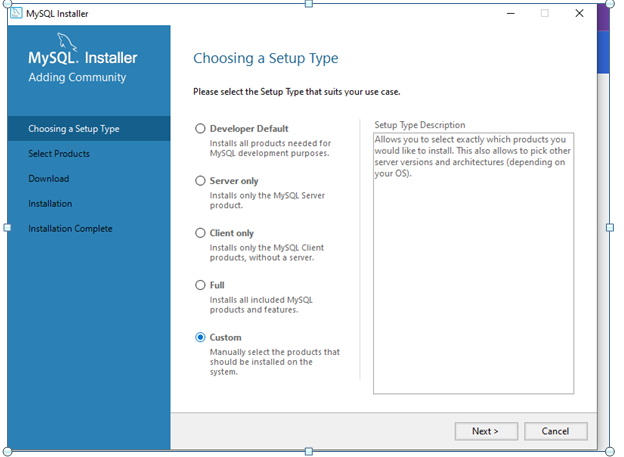
ab isko install kar lege..
install kar rhayehoge tab ye obtion ayga,,
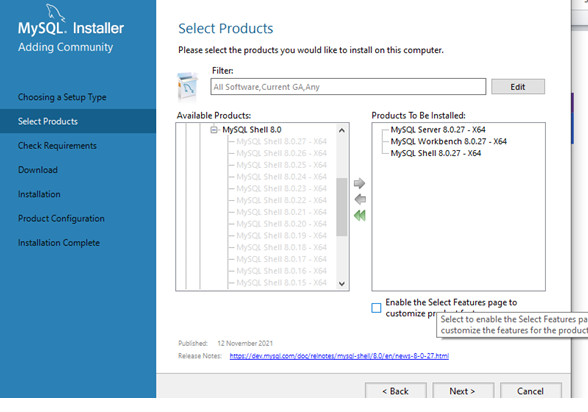
NECHE three file ko download karna hai :- server, workbench or shell...
Tino install ho jane ke bad MYSQL installation finess ho jayga.
⦿install ho jane ke baad mere computer meMYSQL workbench install ho jayega.
1. Database ko create karne ka command
create database student;
2.konsa database hame use karna ho uska command
iska matlab ke database use me aa chuka hai ..
use student;
3.Table create karne ka command (small and captal dono me lik sakte hai );
create table personal(
id INT,
name VARCHAR(50),
birth_date DATE,
phone VARCHAR(12),
gender VARCHAR(1)
);
4. Table ko show karne ke command
SELECT * FROM student.personal;
5.TAble me value insert karna ka command
insert into personal( id ,name , birth_date,phone,gender)
value(13,"sonu", "2000-08-31","887331711043","M");
5.1 ager muj or recode add karna chata hu base Just ja kar value change karduga muj personal ka info insert karna hai value ke ander value change kar dege
insert into personal( id ,name , birth_date,phone,gender)
value(14,"aman", "2005-08-31","88733171143","M");
6. Ek hi bar me multipal recod dalna ho to ye command hai ..
insert into personal( id ,name , birth_date,phone,gender)
values
(3,"aman", "2005-08-31","88733171143","M"),
(4,"DEEpak", "2000-09-23","8333171143","R"),
(5,"aman", "2005-08-31","88733171143","G"),
(6,"Rad", "2009-08-31","8878471143","F");
7.constraint ko use karke tabe create
create table apna(
id int not null unique,
name varchar(50) not null,
age int not null check(age >=18),
gender varchar(1) not null,
phone varchar(10) not null unique,
city varchar(13) not null default 'manua'
);
8.sare row and colum ko dekhana hai command likege..
SELECT * FROM apna;
9 agar muj paricullar columm ko name dikana chahte hai ye command likhege
SELECT id,name,phone FROM apna;
10. ager muj id ka name change karna chata hai .. SELECT id as ID ,name as Student,phone as Phonee FROM apna;
11. Ager muj student name ke id me name add karna hai uska command
SELECT id as ID ,name as "Student name ",phone as Phonee FROM apna;
12. jab muj condisnal base data likana hai to command likege
SELECT * FROM info
where gender = "F";
SELECT * FROM info
where age <20;
13. AND & OR Operatores ISME DO SE JADA CONDITION WORK KARBA SAKTE HAI
WHERE AGE >= 18 AND AGE <=21
WHERE AGE=18 OR AGE =21
where age >= 18 AND age<=21;
SELECT * FROM info
where age in(17,21);
SELECT * FROM student.info
where city in("hajipur","delhi");

15.Between & Not operator
SELECT * FROM student.info
where age between 18 and 20;
SELECT * FROM student.info
where birth_date between "1995-01-01" And "1995-06-30";
l
mysql





Comments
Post a Comment